Where ‘use client’ Belongs in the Next.js App Router
A practical guide to drawing the server/client boundary in the Next.js App Router: what actually moves into the client bundle, why leaf components beat server-everything purism, and how to audit an existing tree for misplaced directives.

in Production Stacks9 min readUpdated
Someone adds a useState to app/dashboard/layout.tsx to track whether the sidebar is collapsed. The build fails. They paste 'use client' at the top of the file, the error disappears, and every component that layout imports is now part of the client bundle. That fix takes two seconds and nobody notices the cost for weeks.
This is written for teams already on the App Router who keep bouncing between that error and the over-correction that follows it: hoisting state into URL params, splitting components into awkward shapes, treating the directive itself as something to be avoided. The official position is narrower and more useful than either extreme.
Baseline for everything here is Next.js 16, which shipped on 2025-10-21 (Next.js 16 (opens in a new tab)), with docs current as of the 16.3.5 publication.
What ‘use client’ actually does
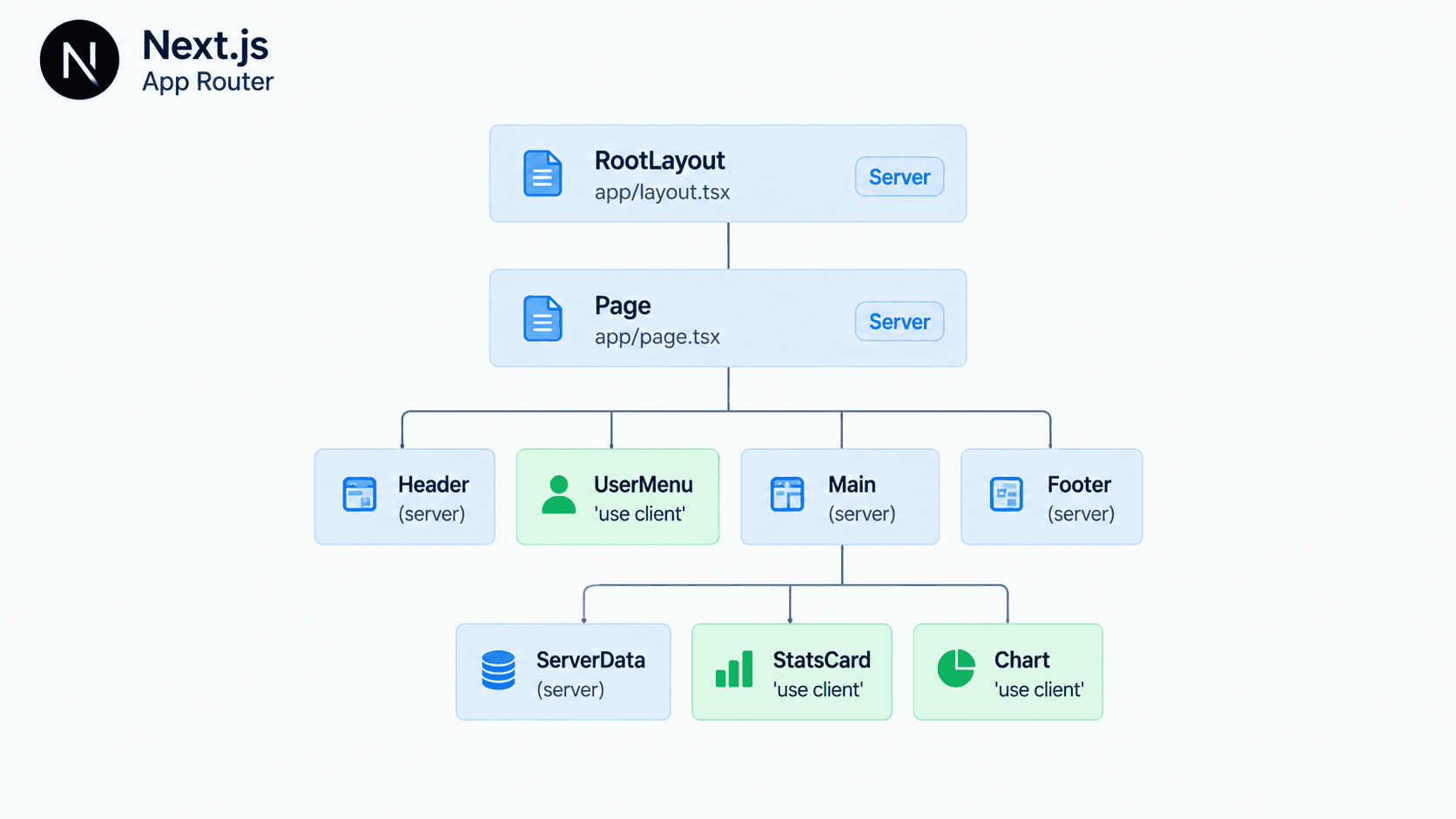
The directive marks a boundary, not a file. The docs describe it as declaring an entry point into the client: you only need it on files whose components you render directly inside a Server Component, and the exports of those files become the entry points (use client reference (opens in a new tab)). Files imported by a Client Component don’t need their own directive. They’re already on the client side of the boundary.
The part that bites people is what travels with the entry point. Once a file is marked, all of its imports and every component it directly renders are included in the client bundle (Server and Client Components (opens in a new tab)). That’s the mechanism behind the layout mistake. A layout usually imports a nav, a breadcrumb, a user menu, a footer, plus whatever utility modules those pull in. Mark the layout and you’ve moved the whole import graph across.
The escape hatch that most teams miss: Server Components passed as children or as props are not pulled into the client bundle. They render on the server and arrive at the Client Component as already-rendered output (docs (opens in a new tab)). So a client wrapper can hold interactive state around server-rendered content without dragging that content along.
'use client'

import { useState, type ReactNode } from 'react'

export function CollapsibleShell({ children }: { children: ReactNode }) {
  const [open, setOpen] = useState(true)

  return (
    <div data-open={open}>
      <button onClick={() => setOpen((v) => !v)} aria-expanded={open}>
        Toggle sidebar
      </button>
      {children}
    </div>
  )
}import { CollapsibleShell } from '@/components/collapsible-shell'
import { ServerSidebar } from '@/components/server-sidebar'
export default function DashboardLayout({
children,
}: {
children: React.ReactNode
}) {
return (
<CollapsibleShell>
<ServerSidebar />
{children}
</CollapsibleShell>
)
}ServerSidebar stays on the server here. If collapsible-shell.tsx imported it directly instead of receiving it as a child, it would not.
Client Components still render on the server
“Client” does not mean browser-only, and the misreading causes real bugs. On a direct visit, a Client Component is rendered to HTML on the server and then hydrated in the browser; only on subsequent client-side navigation does it render purely in the browser from the RSC Payload (Server and Client Boundary (opens in a new tab)).
The practical consequence: module top-level code in a 'use client' file runs during the server render too. Touching window, document or localStorage outside an effect will still throw. Dynamic imports, effect-scoped access and typeof window guards are all still necessary, and adding the directive doesn’t retire any of them.
Push the boundary down to the leaves
This is the documented recommendation rather than a stylistic preference. To reduce the client JavaScript bundle, add 'use client' to specific interactive components instead of marking large parts of the UI as Client Components (docs (opens in a new tab)). The docs’ own example keeps a layout as a Server Component and marks only the <Search /> component inside it.
So the search box that needs useState lives in components/search.tsx with the directive, and app/layout.tsx imports and renders it while staying on the server. Everything else in that layout, including whatever data fetching it does, stays out of the bundle.
'use client'

import { useState } from 'react'

export function Search() {
  const [query, setQuery] = useState('')
  return (
    <input
      value={query}
      onChange={(e) => setQuery(e.target.value)}
      placeholder="Search"
    />
  )
}
The trade-off is real and worth stating: more files, more prop plumbing, and a genuinely annoying refactor when a leaf turns out to need data its server parent never fetched. You’ll split a component, then split it again when a designer moves a button.
There’s a point where that stops paying. A page that is 90% interactive, like a rich text editor, a canvas tool or an editable data grid, is fine as a single client subtree. Fragmenting it buys nothing because nearly every node ends up on the client anyway. The rule is about avoiding accidental inclusion, not about minimizing directive count.
Be skeptical of any specific bundle-size figure attached to this advice, including one you might read in a blog post. There are no official numbers for what moving the directive down the tree saves, because the answer depends entirely on the import graph you happen to have. Measure your own routes.
Providers go as deep as they can
React context isn’t supported in Server Components, so theme, query-client and auth providers force a client boundary wherever they sit. The docs advise rendering providers as deep in the tree as possible, so Next.js can optimize more of the static Server Component output (docs (opens in a new tab)).
Two cases that get conflated here. A provider file marked 'use client' that wraps {children} in the root layout is usually acceptable, because those children are Server Components passed as props and stay on the server. What is not free is everything that provider file imports. A provider module that pulls in a full theme object, an analytics SDK and a design-token package ships all three to every route. Keep the provider module thin, or move it below the routes that don’t need it.
Interactivity that needs no Client Component
Before reaching for useState, check the list the docs give of interactive behavior that needs no Client Component at all: <details> and <summary> for disclosure UI, <video controls> for playback, and a <form> whose action is a Server Function (boundary guide (opens in a new tab)).
Disclosure widgets and simple mutations are the two things most often turned into Client Components for no reason. An FAQ accordion built from <details> is a Server Component with zero bundle cost. A form that posts to a Server Function needs no client handler, and because the submission is a real form post, it can work before hydration completes. Don’t promise full offline-grade progressive enhancement from that alone, but it’s a genuine side benefit of the pattern.
Server Functions were called Server Actions in older material; the current docs use “Server Functions”, so search accordingly when reading older posts.
How data and code cross the boundary
The boundary guide states the two rules plainly: code crosses via imports, data crosses via props, and props must be serializable (boundary guide (opens in a new tab)). A Server Function is the exception on the code side. It crosses as a reference rather than as code, so the implementation stays on the server and the client gets a callable handle.
One detail that surprises teams during upgrades: the Next.js TypeScript plugin only permits function props named action or ending in Action when they cross the boundary (boundary guide (opens in a new tab)). Name it onSubmit and you’ll get flagged. Name it submitAction and you won’t.
Streaming a promise across the boundary
When a Client Component needs server data, you don’t have to await it in the parent and block. Start the request in the Server Component, pass the pending promise down, and read it with React’s use() inside the Client Component; the nearest Suspense fallback renders while it’s pending (boundary guide (opens in a new tab)).
// app/page.tsx (Server Component)
import { Suspense } from 'react'
import { Posts } from '@/components/posts'
import { getPosts } from '@/lib/posts'

export default function Page() {
  const posts = getPosts() // not awaited
  return (
    <Suspense fallback={<div>Loading posts…</div>}>
      <Posts posts={posts} />
    </Suspense>
  )
}'use client'
import { use } from 'react'
type Post = { id: string; title: string }
export function Posts({ posts }: { posts: Promise<Post[]> }) {
const allPosts = use(posts)
return (
<ul>
{allPosts.map((post) => (
<li key={post.id}>{post.title}</li>
))}
</ul>
)
}Note the shape of Post in that example. It’s the projection the UI needs, not whatever getPosts returns from the database.
Props crossing the boundary are visible to the browser
This is the part of boundary design that has security consequences. Data crosses as serialized props, which means it is part of the RSC payload the browser receives. Passing a whole database row, a session object or an internal user record to a Client Component publishes every field on it, including the ones your JSX never renders.
So select and project on the server. Pass { id, title, authorName }, not the row that also carries passwordHash, stripeCustomerId and internalNotes. The same reasoning applies to Server Functions: a Server Function is a callable server endpoint reachable by anyone who can reach your app, so it must do its own authentication and authorization checks. The fact that the button calling it is only rendered for admins is a UI affordance, not an access control boundary. Scope the query inside the Server Function by the authenticated user or tenant rather than fetching broadly and filtering afterwards.
If you want a compile-time guard against server-only modules leaking into a client graph, the server-only and client-only packages are optional installs in Next.js 16 — Next.js handles those imports internally and ships its own type declarations (docs (opens in a new tab)). Useful on database and secret-handling modules. Not a substitute for authorization checks.
Compound components break across the boundary
When a Server Component imports a Client Component, what it receives is a client reference rather than the actual module object. Attached sub-components disappear: Menu.Item evaluates to undefined (boundary guide (opens in a new tab)). Export Menu and MenuItem as separate named exports instead. Worth knowing before you build a component library that only gets used from client parents during development.
Auditing an existing tree
Run through this on a route that feels heavier than it should:
- Grep for
'use client'inapp/**/layout.tsxandapp/**/page.tsx. Each hit is a candidate for extraction into a leaf component. Check whether the file really needs state or browser APIs, or whether one child does. - For every marked file, read its import list. Anything imported there ships. Icon packs, date libraries, chart libraries and analytics SDKs are the usual weight.
- Check whether server content is being imported into a client file when it could be passed as
children. This is the single highest-leverage fix in most trees. - Find provider files and ask how deep they could move. A provider needed only by
/dashboarddoesn’t belong in the root layout. - Replace hand-rolled accordions and toggles with
<details>where the design allows, and hand-rolled submit handlers with a<form action={serverFn}>where the mutation is simple. - Inspect what crosses as props. Whole rows, session objects and API responses passed verbatim are both a payload-size problem and a data-exposure problem.
- Confirm Server Functions authenticate and authorize independently, and that their queries are scoped by the caller’s identity rather than filtered after a broad fetch.
The operating rule that falls out of all this: put 'use client' on the smallest component that actually owns state, an event handler or a browser API, and let everything around it stay on the server by passing server-rendered output as children. When that rule produces more than three or four extra files for one feature, the feature is probably interactive enough to live in a single client subtree, and you should stop fighting it.