Docker Sandboxes for AI Agents: Files, Secrets and Network Rules
Docker Sandboxes run coding agents in their own microVM. What that isolates compared with a container, and how to set up clone mode, proxy-injected credentials, deny-by-default network rules, kits, templates and shared skills so the isolation still holds.

in AI Coding & Developer Tools7 min read
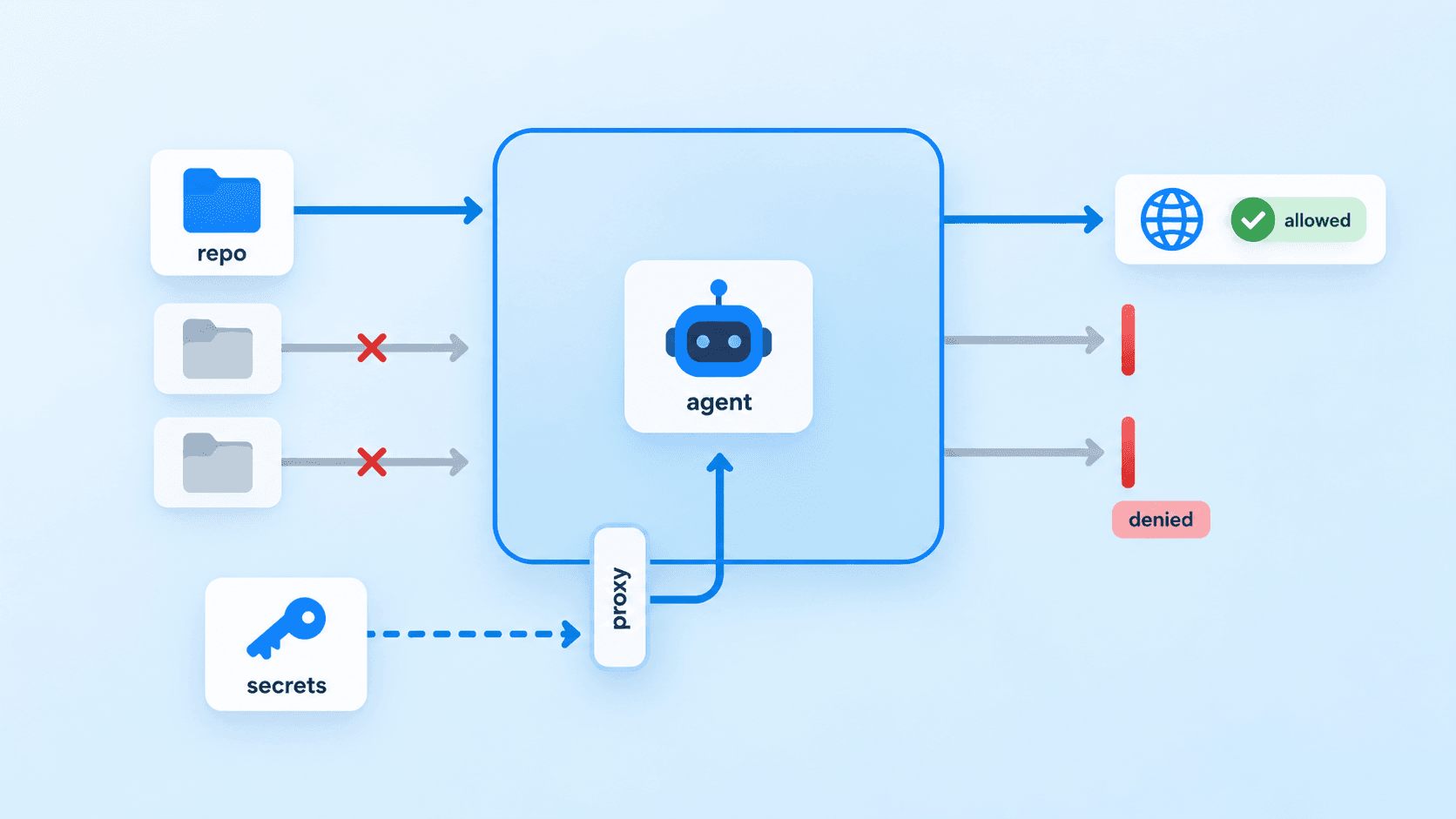
Coding agents are most useful when you stop approving every command, and that is exactly when they can delete a directory, leak a key or push a half-finished branch. Docker Sandboxes run the agent in its own microVM so you can let it work unattended without handing it your machine. This guide is for engineers setting that up: what the sandbox actually isolates, and how to configure the workspace, credentials and network so the isolation still holds once the agent has real work to do.
Why a sandbox isn’t just a container
Docker’s documentation describes each sandbox as a microVM with “its own Docker daemon, filesystem, and network” (Docker Sandboxes (opens in a new tab)). The difference from a container is the kernel. A container shares the host kernel and is separated by namespaces; if you mount the Docker socket so the agent can build images, it also shares your host’s Docker daemon, which is close to handing over the host. A sandbox gets a separate kernel behind a hypervisor and a private Docker Engine with no path to yours.
Docker’s own comparison is a fair summary: sandboxes give full hypervisor isolation and an isolated daemon, a container with the socket mounted gives partial isolation and the shared host daemon, and sandboxes trade “higher resource overhead (a VM plus its own daemon) for complete isolation” (Architecture (opens in a new tab)). That overhead is real. Each sandbox keeps its own images and packages, and sandboxes don’t share layers, so disk use grows with every one you keep around.
Use a plain container for tools you trust and that don’t need Docker. Use a sandbox when something autonomous needs full control of an environment, including sudo and its own containers, and you don’t want that control to reach your host.
Start a sandbox and know what it can touch
Docker’s current tooling is the standalone sbx CLI. From a project directory, one command creates the VM and starts the agent:
cd ~/code/my-service
sbx run claude
That default is worth understanding before you walk away from it. sbx run mounts the current directory read-write, and the agent can “read, write, and delete any file within that directory, including hidden files, configuration files, build scripts, and Git hooks” (Default security posture (opens in a new tab)). Outside that directory and a shared skills store, it can’t reach your filesystem, your Docker daemon or other sandboxes, and direct external UDP and ICMP are blocked (Security model (opens in a new tab)).
Direct mode is fine for turn-by-turn work where you watch every change. It is not the mode to leave running overnight.
Keep the agent’s changes out of your working tree
The workspace is where most of the remaining risk sits, because the files the agent can edit include files that run on their own: Git hooks, CI configuration, package.json scripts, a Makefile. Docker’s security page points out the trap that catches reviewers: “Git hooks live inside .git/ and do not appear in git diff output — check them separately” (Security model (opens in a new tab)). A clean-looking diff doesn’t mean the next git commit on your machine is safe.
Clone mode moves that boundary. The host repository is mounted read-only at /run/sandbox/source, and the agent works in a private clone inside the VM, so nothing lands in your working tree until you fetch it (Git workflows (opens in a new tab)):
# Start the agent on a private clone of the current repository
sbx run --clone --name my-service claude .

# Later, from the host: bring the agent's branch over and review it before merging
git fetch sandbox-my-service
git log --oneline sandbox-my-service/feat/rate-limits
git diff main...sandbox-my-service/feat/rate-limits
Three details matter. The clone is “not a Git worktree linked to your host checkout”, so the agent never touches your checkout’s branches or index. --clone is fixed when the sandbox is created. And one clone can hold several branches, so for parallel tasks tell the agent to create a branch per task; the flag alone doesn’t separate them.
Clone mode keeps changes away from your working tree, not away from your remotes. sbx copies remotes such as origin into the clone, so an agent with a GitHub credential and network access to GitHub can push. If review before anything leaves the machine is the point, don’t give the sandbox a token that can push, or give it one scoped to a fork.
Give the agent credentials without giving it the secrets
The credential design is the part most home-grown container setups get wrong. Instead of passing API keys in as environment variables, sbx runs a proxy on your host that overwrites the auth header on outbound requests: “the real value never enters the sandbox — the agent sees only a sentinel like proxy-managed” (Credentials (opens in a new tab)). A prompt-injected agent that dumps its environment finds a sentinel, not the key.
Values live in your OS keychain and can come from a command instead of a stored string, which keeps short-lived tokens short-lived:
sbx secret set anthropic                       # prompts for the key, stores it in the OS keychain
sbx secret set github --command 'gh auth token' # resolves the token from the GitHub CLI when needed
sbx secret ls
The one way to undo all this is to paste a key into a file inside the sandbox. It then persists in the VM, and if you later save that sandbox as a template, Docker warns that the saved image captures “any secrets stored on it” (Templates (opens in a new tab)).
Network policies: deny by default, then prune the defaults
Outbound access starts closed: “All outbound TCP traffic, including HTTP, HTTPS, and SSH, is blocked unless an explicit rule allows the destination” (Default security posture (opens in a new tab)). The catch is what “explicit rule” already includes. The default allow list contains broad wildcards, and Docker notes that some, such as *.googleapis.com, “cover many services beyond AI APIs” (Security model (opens in a new tab)). Run sbx policy ls before your first unattended session and remove what the agent doesn’t need.
Add destinations deliberately, including ones on your own machine. A service on the host is reachable at host.docker.internal, but only after you allow its port on localhost (Develop and test locally (opens in a new tab)):
sbx policy ls
sbx policy allow network localhost:11434   # a model server on the host, reached as host.docker.internal:11434
That’s also the practical way to use a local model from a sandboxed agent. The model server, LM Studio or another, runs on the host with access to your GPU; the agent in the sandbox can reach exactly one port on your machine. Running the model inside the sandbox instead is possible on a Linux host with NVIDIA GPU passthrough, which Docker documents separately (Configure Docker Sandboxes (opens in a new tab)).
Kits and templates for repeatable environments
Once a sandbox is set up the way you want, you’ll want the next one to start the same way. Docker offers two tools that work together (Customizing sandboxes (opens in a new tab)). A template is a container image: build it from a Dockerfile and push it to a registry, or save a configured sandbox with sbx template save. A kit is a spec.yaml applied when the sandbox is created: tools to install, environment variables, credentials to inject, files to drop in and network rules.
Kits come in two kinds. A mixin (kind: mixin) adds capabilities to an existing agent, and a sandbox kit (kind: sandbox) defines an agent from scratch, including the image it runs in and its entrypoint (Kits (opens in a new tab)). That’s the route for an agent Docker doesn’t ship, such as Pi: package it in an image and describe how to launch it and what it may reach. An excerpt of the relevant parts of a sandbox kit:
# spec.yaml (excerpt: see Docker's kit reference for the full set of required fields)
kind: sandbox
sandbox:
  image: "registry.example.com/agents/pi:1.0"
  entrypoint: [pi]
permissions:
  network:
    allow:
      - registry.npmjs.org
    deny:
      - telemetry.example.com
If a domain matches both an allow and a deny rule, the deny wins. Kits are experimental, and their install commands run as root inside the sandbox, which is why sbx only loads kits from Docker Hub by default. To load your team’s kits from a Git repository, add that prefix to kit.allowedSources, such as github.com/your-org/, rather than the ["*"] Docker recommends against. The setting replaces the whole list, so keep docker.io/ in it.
Share skills without sharing a trust boundary
Agent skills (folders with a SKILL.md) install into a persistent store that new sandboxes mount, and they can come straight from a Git repository (Share agent skills (opens in a new tab)):
sbx skills add your-org/agent-skills --skill release-notes --skill db-migrations
sbx skills ls
Keep the default read-only mount. A sandbox with readwrite access can change skills that every other sandbox loads, and Docker’s security page is explicit that this “does put participating sandboxes in the same trust boundary” (Security model (opens in a new tab)). One compromised session could quietly rewrite the instructions the next agent follows. Change skills in the Git repository, review them like code, and update the store with sbx skills update.
A setup order that holds
Store every credential with sbx secret set before the first run, and scope any Git token so it can’t push to the main repository. Start unattended work with --clone, review with git fetch and a diff against your main branch, and check .git/hooks whenever you’ve used direct mode. Prune sbx policy ls down to what the agent needs, then add host services one port at a time. Put the result in a template and a kit from an allowed source, so the next sandbox starts with the same boundaries instead of the defaults.
Sources
- Docker Sandboxes (opens in a new tab)
- Docker Sandboxes: Architecture (opens in a new tab)
- Docker Sandboxes: Security model (opens in a new tab)
- Docker Sandboxes: Default security posture (opens in a new tab)
- Docker Sandboxes: Use Git with sandboxes (opens in a new tab)
- Docker Sandboxes: Manage credentials (opens in a new tab)
- Docker Sandboxes: Develop and test locally (opens in a new tab)
- Docker Sandboxes: Configure Docker Sandboxes (opens in a new tab)
- Docker Sandboxes: Customizing sandboxes (opens in a new tab)
- Docker Sandboxes: Kits (opens in a new tab)
- Docker Sandboxes: Templates (opens in a new tab)
- Docker Sandboxes: Share agent skills (opens in a new tab)