One VPS or a Managed Platform? An Honest Cost Teardown
The monthly invoice is the smallest term in the comparison. A cost teardown of a single VPS against a managed Node.js-capable platform: patching hours, exposure from first boot, runtime upgrade cadence, and the compatibility work you skip or inherit.

in Production Stacks7 min readUpdated
A two-person team ships a Node.js API on the cheapest instance tier their provider sells, and for about a year the hosting line is invisible on the card statement. Then a kernel CVE lands during launch week, nobody owns the reboot window, and a founder spends a Saturday on apt output. This teardown is for teams choosing sides without a platform engineer on staff, where the scarce resource is engineering attention rather than dollars.
The invoice is the smallest term in the comparison
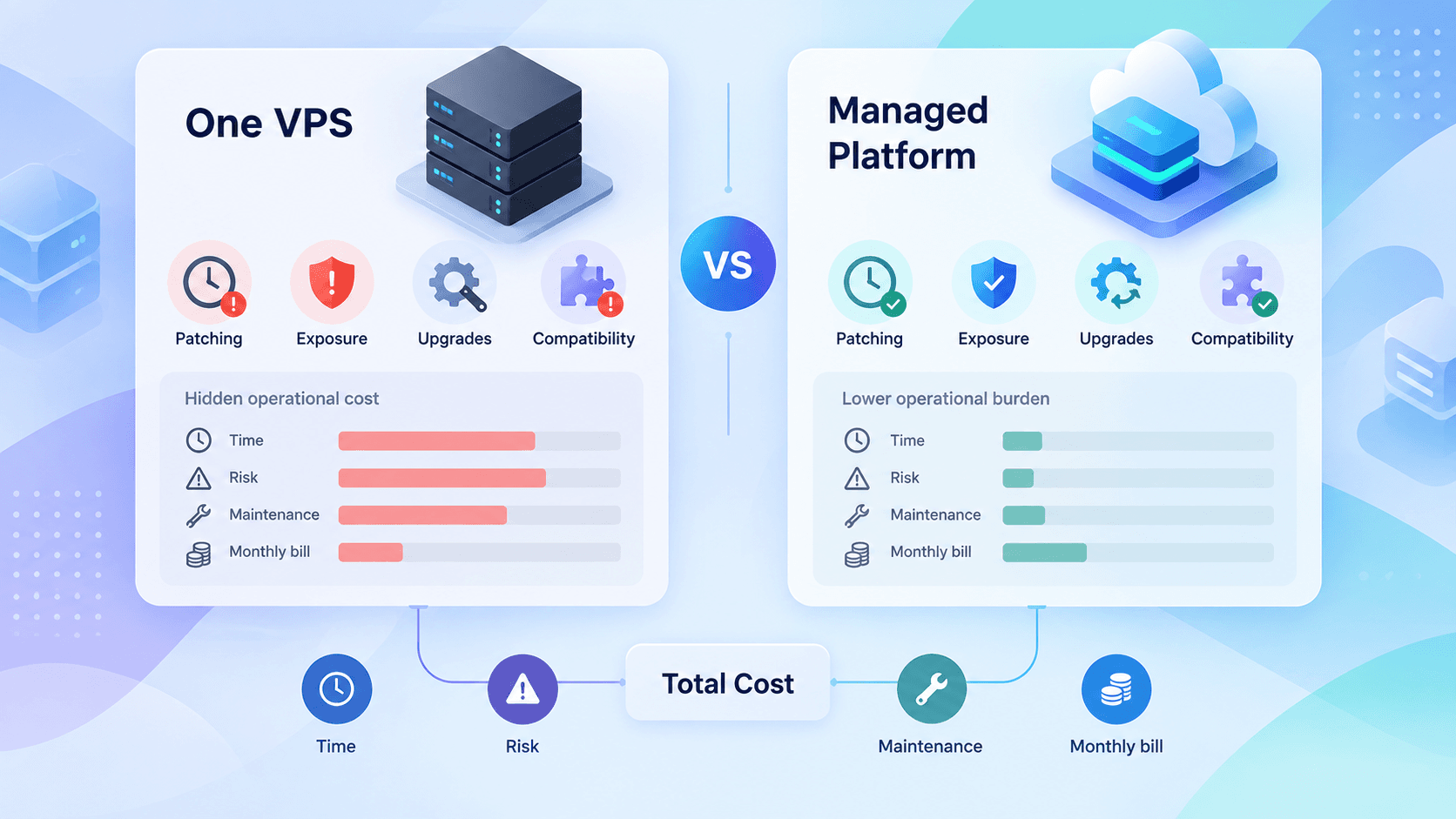
Compare these two options honestly and the hosting fee barely moves the result. The terms that matter are:
- the fixed monthly bill for capacity you provision whether or not it’s used;
- hours spent on patching, runbooks, backups, and TLS renewals, priced at a loaded hourly rate rather than at zero;
- hours spent on compatibility work when your runtime isn’t plain Node.js on plain Linux;
- the tail: what a compromised or wedged box costs you in recovery time and customer trust.
The structural difference is that a VPS bill scales with the peak capacity you decide to provision, while a usage-priced managed platform bills roughly with traffic. For a product with spiky or tiny traffic, that asymmetry usually favors the managed side before you count a single hour of labor. For steady, CPU-heavy, egress-heavy workloads it can flip hard in the other direction. Pull your own numbers from both providers’ current pricing pages and put them into the same spreadsheet as your hours; don’t compare a monthly VPS fee against a per-request price by intuition.
The honest version of the VPS case is that a box maintained by someone who already knows Linux is genuinely cheap, and the ongoing work is closer to twenty minutes a month than to a second job. The honest version of the failure case is that nobody on a three-person team owns those twenty minutes, so they accumulate into a quarterly panic.
Exposure starts at boot, not at launch
The moment a VPS gets a public IPv4 address, it joins the population that internet-wide scanners enumerate continuously. Academic honeypot work describes the effect plainly: hosts are hit within minutes of activation, with the important caveat that this applies to internet-facing systems without inbound filtering (A Survey on Honeypot Software and Data Analysis (opens in a new tab)). A widely shared community write-up (opens in a new tab) reports three fresh IPs logging thousands of unsolicited connection attempts inside an hour, mostly credential stuffing against IoT defaults. Those specific counts aren’t independently verifiable, but the shape matches what any packet capture on a new box will show you.
Draw the distinction carefully, because this is where teams either panic or get complacent. Background scanning is not a targeted threat. It’s weather. It costs you nothing as long as the only things listening are services you intended to expose, patched, without password authentication. What it does do is convert every configuration mistake into an exploited configuration mistake on a short timeline. A Redis instance bound to 0.0.0.0 for five minutes during debugging is a different risk on a VPS than on a laptop.
The practical consequence for cost: a VPS does not need heroic hardening, it needs a baseline applied on day one and never regressed. That baseline is cheap to apply and expensive to retrofit after the box has grown three years of undocumented ports.
apt-get update && apt-get install -y unattended-upgrades ufw
dpkg-reconfigure -plow unattended-upgrades

ufw default deny incoming
ufw allow 80/tcp
ufw allow 443/tcp
ufw enable

# Key-only SSH, ideally reachable only over the provider's private network
# or a WireGuard/Tailscale interface rather than the public IP.
sed -i 's/^#\?PasswordAuthentication.*/PasswordAuthentication no/' /etc/ssh/sshd_config
systemctl restart ssh
One thing that surprises people: unattended-upgrades installs security packages but does not reboot by default, so a machine can sit for months running a patched-on-disk, unpatched-in-memory kernel. If you take the VPS route, set Unattended-Upgrade::Automatic-Reboot with a maintenance window, or accept that you have manually scheduled reboots on your calendar forever. Deciding not to decide is the expensive option.
The compatibility tax got smaller, and moved
The classic argument for a VPS is that node server.js works and edge runtimes don’t. That argument is weaker than it was. On Cloudflare Workers, Node.js compatibility is enabled by default for projects with a compatibility date of 2026-08-04 or later, so built-in Node APIs and polyfills are available without adding flags (Workers Node.js compatibility docs (opens in a new tab)). Projects pinned to an older date, anywhere from 2024-09-23 through 2026-08-03, still need the explicit nodejs_compat flag. Existing configs don’t have to strip the flag when they move the date forward, but there’s no reason to put it in a new one.
{
  "name": "billing-api",
  "main": "src/index.ts",
  "compatibility_date": "2026-09-15",
  "observability": { "enabled": true },
  "hyperdrive": [
    { "binding": "HYPERDRIVE", "id": "<your-hyperdrive-id>" }
  ]
}
Buffer, Crypto, Events, HTTP/HTTPS, Net, Path, Streams, URL, Util, and Zlib are implemented natively rather than shimmed, and the same platform rebuild raised the application size ceiling to 64 MiB and added a URL-based module registry with lazy compilation and shared code caches (Cloudflare’s writeup (opens in a new tab)). That covers a surprising share of a normal API dependency tree.
The tax didn’t disappear, it moved to a place that’s harder to detect at build time. Several modules, including node:child_process, node:worker_threads, node:readline, node:tty, and node:v8, resolve as non-functional stubs rather than failing the import. An npm dependency that conditionally reaches for child_process will bundle and deploy cleanly, then misbehave on the code path that actually calls it. Budget real hours for that discovery loop if your dependency tree is deep, and treat “it deployed” as a much weaker signal than it is on a VPS. Architecturally, the same pressure shows up at the framework level, where the platform nudges you toward a specific split between what runs where; the reasoning is similar to deciding where 'use client' belongs in the App Router.
Whose upgrade calendar do you live on?
On a VPS you inherit the Node.js release schedule directly. Node.js 22 and 24 are the current active LTS lines, with 26 moving to LTS on the October schedule after its Current phase (Node.js 26.0.0 release notes (opens in a new tab)). From Node.js 27 onward the project moves to an annual cadence where every major goes to LTS after six months of Current (Evolving the Node.js Release Schedule (opens in a new tab)). More predictable, but it also means a runtime upgrade lands on your plate on a known yearly rhythm rather than whenever you happen to notice.
On a managed runtime you trade that for a different obligation: a compatibility date in a config file. The platform’s runtime moves underneath you, and your pinned date decides how much of that movement you accept. It’s less work, not zero work, and it’s the kind of work that’s easy to defer for two years until the gap between your pinned date and the current default is large enough to make the bump risky.
Pick your poison deliberately. The VPS asks for an hour a year plus reboot windows. The managed platform asks for a date bump and a smoke test, on a cadence you choose.
Where the line actually sits
Run these checks against the workload, not against your preferences. Each one that points to a VPS is worth more than three that point to managed, because a single hard incompatibility forces the decision.
- Does it need a long-running process? Queue consumers, WebSocket fan-out with server-held state, cron-driven batch jobs measured in minutes, anything using
child_processorworker_threadsfor real work. A VPS, or the managed platform’s dedicated primitive for that job, not its request handler. - Does it need the filesystem as a durable store? SQLite on local disk, uploaded files written to
/var/lib, a Git repo the app mutates. VPS, or a rewrite onto object storage. - Native addons. Anything compiling against system libraries at install time. VPS or a container platform.
- Traffic shape. Bursty or near-zero baseline favors usage pricing; steady high CPU utilization favors a fixed box.
- Egress volume. Heavy outbound bandwidth is where managed bills get ugly and where a VPS with generous included transfer wins outright. Model it before migrating.
- Who reboots at 2am? If the answer is “nobody has ever done it”, your uptime on a VPS is a function of luck.
- Compliance and residency. Specific region pinning or data residency guarantees can rule out edge execution entirely. Check the contract, not the marketing page.
If items one through three are all no, the managed platform is usually the cheaper total, and the savings are hours rather than dollars. Those hours are better spent on things a small team can’t outsource, like keeping review gates meaningful when an agent wrote part of the diff.
The common good answer is a hybrid that most comparisons skip: request handling on the managed platform, one small VPS for the two things that genuinely need a process, with that box firewalled to the private network and no public listener at all. You get usage-scaled request costs and the box keeps a tiny attack surface because nothing on the public internet can reach it.
A few things fall outside this frame entirely. GPU inference, self-hosted databases with meaningful data volume, and anything with a bring-your-own-license constraint have their own economics. Vendor exit cost is real but usually overstated for HTTP handlers and understated for platform-specific storage bindings; count your bindings, not your route handlers, when estimating how stuck you’d be.
Before you migrate anything, do this: take last quarter’s actual hours on the current setup, multiply by loaded cost, and put that number next to the platform’s price at your real request volume and egress. If the difference is smaller than one engineer-week per quarter, stay where you are and spend the week on the product instead.
Sources
- Node.js compatibility — Cloudflare Workers docs (opens in a new tab)
- How we rebuilt Cloudflare Workers’ module registry for Node.js compatibility (opens in a new tab)
- Node.js 26.0.0 release announcement (opens in a new tab)
- Evolving the Node.js Release Schedule (opens in a new tab)
- A Survey on Honeypot Software and Data Analysis (arXiv) (opens in a new tab)
- I rented three servers, told nobody, and watched the internet break in anyway (opens in a new tab)