Stream LLM Responses Through a Reverse Proxy Without Buffering
Tokens stream on localhost, then arrive late and in clumps behind a production proxy. How nginx, HAProxy, Caddy and Cloudflare can hold them, how to survive idle timeouts, and a probe that measures per-event latency and fails CI when events are held.

in AI Infrastructure & Ops11 min readUpdated
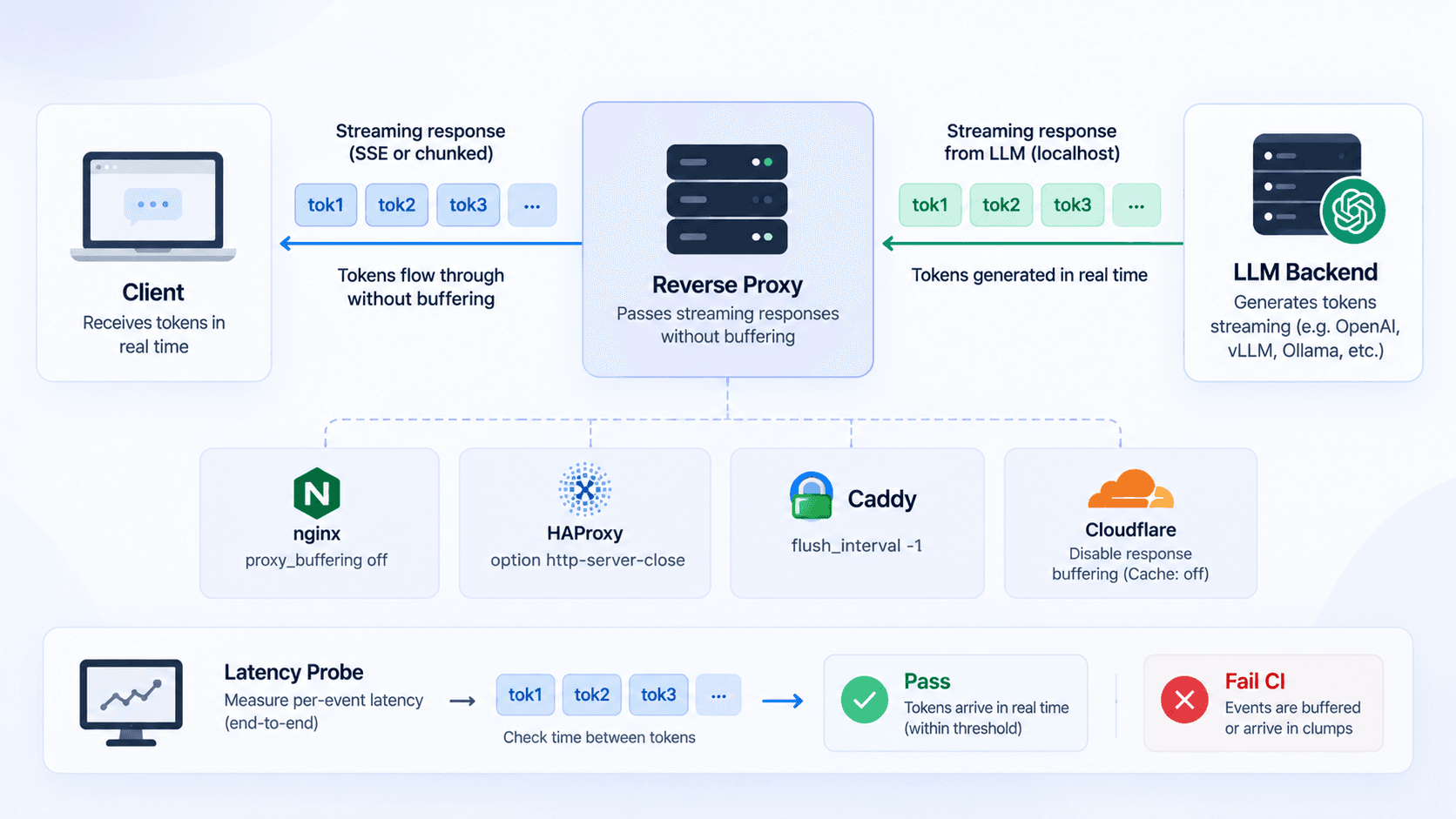
Token streaming works on localhost: the chat UI fills in word by word. Behind the production proxy, the first token shows up a beat late and the rest arrive in clumps, which users read as a slow model. This is for engineers running LLM features behind nginx, HAProxy, Caddy or Cloudflare who need to find the hop that holds the bytes, fix it, and keep it fixed.
Turning off proxy_buffering in nginx may not be the fix
Search for this problem and you’ll be told to turn off proxy_buffering in nginx. The setting is real. It defaults to on, and with it on nginx reads the upstream response into buffers, spilling to temporary files if it has to. With it off, the response is passed to the client “synchronously, immediately as it is received” (nginx proxy module (opens in a new tab)).
What the docs don’t say is whether buffering holds back small writes. In one recent benchmark, frames of about 60 bytes sent every 50 ms through nginx 1.31.5 arrived with a 3 ms time to first token and 50 ms gaps, the same with buffering on or off (SSE proxy benchmark (opens in a new tab)). That is one setup with one frame size and pace, so it doesn’t show that nginx never delays a stream; it does show that proxy_buffering isn’t automatically the culprit. If the delay sits in another hop, turning it off changes nothing, and it’s easy to conclude the model is slow.
Disable buffering explicitly for event streams anyway, just don’t assume it was the cause. The cheapest way is to send X-Accel-Buffering: no from the application on every streaming response: nginx honours it per response unless proxy_ignore_headers disables it, so the intent lives next to the code that streams instead of in a config file another team owns. If the stream behaves the same afterwards, measure the next hop instead of continuing to tune nginx.
MDN’s server-sent events example sends it too, together with Cache-Control: no-cache (MDN (opens in a new tab)). Just don’t expect the header to help with a proxy that isn’t nginx.
HAProxy can add about 200 ms to tiny SSE writes
In the same benchmark, the delay showed up in HAProxy. On a stock HAProxy 3.4.4 config the first token took 206 ms, and frames arrived in batches: 5.12 frames per read, against 1.02 on a direct connection. X-Accel-Buffering: no made no difference, because HAProxy doesn’t read nginx’s header (SSE proxy benchmark (opens in a new tab)).
The configuration manual describes a mechanism that fits. By default HAProxy favours throughput by having the system wait “for enough data to be available in order to only send full packets”, and it puts the typical cost at “around 200 ms per round trip” (HAProxy manual (opens in a new tab)). The manual presents this as something only unusual, highly interactive uses of HTTP run into. In that benchmark, a steady trickle of tiny token events was enough to trigger it.
Frame size changes the picture. When the benchmark grew frames to about 1.1 KB, the first-token delay on the same HAProxy fell to 53 ms and batching dropped to 1.46 frames per read. Token streams, with one short JSON delta per event, sit at the bad end of that range.
The documented switch is option http-no-delay, which disables those optimizations for connections through the frontend or backend where it appears. The manual is blunt that it “should never be used by default” and that it costs bandwidth and CPU, so scope it to the backend that serves streams:
# /etc/haproxy/haproxy.cfg
defaults
    mode http
    timeout connect 5s
    timeout client 60s
    timeout server 60s

frontend web
    bind :443 ssl crt /etc/haproxy/certs/site.pem
    use_backend llm_stream if { path_beg /api/chat }
    default_backend app

backend llm_stream
    option http-no-delay
    # Inactivity timeout: keep it above the longest silence in a stream.
    timeout server 90s
    server app1 10.0.0.12:3000

backend app
    server app1 10.0.0.12:3000
The benchmark establishes the delay; the fix rests on the manual’s description of the option. Confirm it with the probe further down before you call it done.
Caddy streams SSE by default, until compression gets involved
Caddy needs the least work. Its reverse_proxy doesn’t flush periodically by default, but it ignores that and flushes immediately when a response has Content-Type: text/event-stream or an unknown Content-Length (Caddy reverse_proxy docs (opens in a new tab)). In the benchmark, Caddy 2.11.4 was indistinguishable from the direct path.
The catch is encode. Its default response matcher includes text/*, so event streams are eligible for gzip or zstd (Caddy encode docs (opens in a new tab)). The docs don’t say how a compressed event stream gets flushed. It may well flush on every write, but until you’ve measured it on your version, the safer default is to keep streaming routes out of encode:
# /etc/caddy/Caddyfile
example.com {
	handle /api/chat/* {
		reverse_proxy app:3000
	}
	handle {
		encode zstd gzip
		reverse_proxy app:3000
	}
}
Apply the same caution to other compression steps on the path, whether it’s a framework option, a middleware or a CDN setting. Compression doesn’t necessarily break streaming, and some implementations flush on every write; it’s one more place data can wait, so either exclude event streams or confirm with the probe that events still arrive one at a time.
Cloudflare timeouts and response body buffering
A CDN in front adds limits your origin config can’t see. Cloudflare returns error 524 when the origin “did not provide an HTTP response before the default 125 seconds”; Enterprise plans can raise that to 6,000 seconds, and everyone else is pointed at status polling or a DNS-only subdomain (Cloudflare error 524 (opens in a new tab)). Older posts quote 100 seconds; the current page says 125.
Send response headers as soon as you accept the request, before the model produces anything, so a slow first token never looks like a silent origin. The page doesn’t say whether the clock also runs between chunks once headers are out, so keep the stream from going quiet (next section).
Cloudflare can also inspect response bodies. Since January 2026, Configuration Rules expose a response body buffering setting: “Standard”, the default, inspects a prefix of the body for enabled features, and “None” streams the body directly to the client at the cost of WAF and Bot Management features that need body inspection (Cloudflare changelog (opens in a new tab)). Nothing official says whether Standard mode delays an event stream. Measure through the real edge before trading away inspection, and if you do switch to None, scope the rule to the stream path.
Keep SSE connections alive through idle timeouts
Buffering isn’t the only way a proxy ruins a stream. nginx closes the upstream connection when nothing arrives for proxy_read_timeout, 60 seconds by default, counted between reads rather than across the whole response (nginx proxy module (opens in a new tab)). HAProxy’s timeout server is the same kind of inactivity timer (HAProxy manual (opens in a new tab)). Reasoning models can think for a long time before the first token, and tool calls add silences mid-stream, so a stream that works in a demo gets cut off on the hard questions.
SSE already has the fix. A line starting with a colon is a comment the browser ignores, and MDN suggests sending one periodically to keep the connection alive (MDN (opens in a new tab)). Write : ping\n\n every 15 seconds while the model is quiet, and keep every idle timeout on the path comfortably above that interval.
Two smaller things are worth checking while you’re in the config. Over HTTP/1.1, browsers allow six SSE connections per domain across all tabs, while HTTP/2 negotiates the limit (100 by default), so serve HTTP/2 at the edge if people keep several chats open. And proxy_http_version defaults to 1.1 only since nginx 1.29.7; before that it was 1.0, which is why older SSE guides set it explicitly.
Measure streaming latency with a probe endpoint
You can’t debug stream timing with a real model on the other end. Its token rate varies between requests, and every test run costs money. Add an endpoint that emits a fixed pattern instead, shaped like the worst case from the HAProxy numbers: twenty small events, 50 ms apart.
const encoder = new TextEncoder();
const EVENTS = 20;
const INTERVAL_MS = 50;
const sleep = (ms: number) => new Promise((resolve) => setTimeout(resolve, ms));

export async function GET(request: Request) {
  // This endpoint intentionally holds connections open. It must stay reachable through the
  // public path to measure it, so protect it with a token (and rate limiting at the edge).
  if (request.headers.get("x-probe-token") !== process.env.STREAM_PROBE_TOKEN) {
    return new Response(null, { status: 404 });
  }

  const stream = new ReadableStream<Uint8Array>({
    async start(controller) {
      try {
        for (let seq = 0; seq < EVENTS; seq++) {
          const data = JSON.stringify({ seq, sentAt: Date.now() });
          controller.enqueue(encoder.encode(`id: ${seq}\ndata: ${data}\n\n`));
          await sleep(INTERVAL_MS);
        }
        controller.close();
      } catch {
        // The client went away and the stream was cancelled.
      }
    },
  });

  return new Response(stream, {
    headers: {
      "Content-Type": "text/event-stream",
      "Cache-Control": "no-cache",
      "X-Accel-Buffering": "no",
    },
  });
}
The probe has to travel the same path as real traffic, CDN and proxy included, or it measures a different chain. So don’t move it to a separate hostname or block it at the edge; protect it instead. Require a secret header, keep the token in your CI secrets, and return 404 without it so the endpoint doesn’t advertise itself. If your CDN offers rate limiting, a rule on this path is a cheap extra.
The client measures what a reader actually sees. Its main number is each event’s transport latency, from the server’s sentAt to the moment the client read it, reported as p50, p95 and max along with the time to the first event. It also prints frames per read, the metric from the benchmark (events per read that returned at least one), but only as a diagnostic: read boundaries aren’t network or SSE event boundaries, and several perfectly timely events can arrive in one read. A high frames-per-read next to a high p95 latency is strong evidence of batching; a high frames-per-read on its own isn’t.
const url = process.env.PROBE_URL;
const expectedEvents = 20;
const maxP95LatencyMs = Number(process.env.MAX_P95_LATENCY_MS ?? 150);

const started = performance.now();
const res = await fetch(url, {
  headers: { Accept: "text/event-stream", "x-probe-token": process.env.STREAM_PROBE_TOKEN ?? "" },
});
if (!res.ok || !res.body) throw new Error(`probe returned HTTP ${res.status}`);

// SSE field lines are "name:value" with one optional space after the colon; " data" is a different field.
const dataOf = (frame) =>
  frame
    .split("\n")
    .filter((line) => line.startsWith("data:"))
    .map((line) => line.slice("data:".length).replace(/^ /, ""))
    .join("\n");

const reader = res.body.pipeThrough(new TextDecoderStream()).getReader();
const latencies = []; // receivedAt - sentAt per event, in ms
let pending = "";
let readsWithEvents = 0;
let firstEventMs = null;

for (;;) {
  const { value, done } = await reader.read();
  if (done) break;
  const receivedAt = Date.now();
  pending += value;
  const frames = pending.split("\n\n");
  pending = frames.pop();
  const payloads = frames.map(dataOf).filter(Boolean);
  if (payloads.length === 0) continue;
  firstEventMs ??= Math.round(performance.now() - started);
  readsWithEvents += 1;
  for (const payload of payloads) latencies.push(receivedAt - JSON.parse(payload).sentAt);
}

if (latencies.length !== expectedEvents) throw new Error(`expected ${expectedEvents} events, got ${latencies.length}`);
const sorted = latencies.toSorted((a, b) => a - b);
const percentile = (p) => sorted[Math.min(sorted.length - 1, Math.ceil((p / 100) * sorted.length) - 1)];
const result = {
  url,
  firstEventMs,
  p50LatencyMs: percentile(50),
  p95LatencyMs: percentile(95),
  maxLatencyMs: sorted.at(-1),
  framesPerRead: Number((latencies.length / readsWithEvents).toFixed(2)), // diagnostic only
};
console.log(JSON.stringify(result));
if (result.p95LatencyMs > maxP95LatencyMs) {
  throw new Error(`p95 event latency ${result.p95LatencyMs} ms is over the ${maxP95LatencyMs} ms budget`);
}
sentAt comes from the server’s clock and receivedAt from the runner’s, so each latency also contains the one-way network time and any clock offset between the two machines. Keep both on NTP, and compare runs made from the same machine against the same server, where the offset is the same for every run. That’s why the budget belongs next to a direct-run baseline rather than in a blog post: the right number for a runner in the same region is not the right number for one on another continent.
For a quick look by hand, curl -N against the probe (with the token header) shows events either trickling in or landing in a lump. The -N matters, because curl’s own output buffering would otherwise hide the difference.
Gate deploys on the probe, and don’t retry it
Run the probe twice per deploy: once against the app directly, and once through the full public chain of CDN, proxy and app. The direct run is your noise floor. If it’s already batching, the problem is in the app or its runtime, not the proxy. When only the public run fails, isolate the hop before changing anything (last section).
Be suspicious of your own numbers. The author of that benchmark published a post-mortem of their first test rig: it re-ran measurements until a check passed, audited only one of ten runs, blamed proxy backpressure on the emitter, and picked up drift spikes of about 10 ms from a Docker healthcheck that started a Python process every second (rig post-mortem (opens in a new tab)).
Run the probe once per deploy, keep the raw output, and never retry it until it’s green. Gate on p95 event latency, with a budget of the direct run’s p95 plus whatever the proxy chain is allowed to add, and keep frames per read in the log as a diagnostic. A probe that passes on the third attempt is telling you the stream is sometimes batched. Wire it in like any other required check, the same way you’d gate a merge on evidence rather than on a green tick.
Isolate the hop that holds the stream
When the public run fails, don’t start changing settings. Run the same probe against each hop from the inside out, from the same machine, and compare the numbers:
- The app directly, from a host on the same network, for example the proxy host calling
http://10.0.0.12:3000/api/stream-probe. - The reverse proxy without the CDN, by sending the request straight to the origin under the public hostname. If your origin only accepts traffic from the CDN, run this from an allowed host.
- The public URL, through the CDN.
- The browser. For
EventSourceconnections, Chrome DevTools lists each received message with its time in the request’s EventStream view. If the probe is clean at the public URL and the UI still stutters, the batching is in the client code.
# Step 2: reach the origin proxy directly, keeping the public hostname for TLS and routing
curl -N --resolve example.com:443:203.0.113.10 \
  -H "x-probe-token: $STREAM_PROBE_TOKEN" \
  https://example.com/api/stream-probe
The first boundary where p95 latency jumps is where you investigate, using that component’s settings from the sections above; frames per read tells you whether the jump looks like batching. Keep buffering disabled for event streams on every hop, but once a hop measures clean, move on instead of tuning it further, and re-run the full chain after each change.
Sources
- nginx: ngx_http_proxy_module (opens in a new tab)
- HAProxy 3.2 configuration manual (opens in a new tab)
- Caddy: reverse_proxy directive (opens in a new tab)
- Caddy: encode directive (opens in a new tab)
- Cloudflare: Error 524 (opens in a new tab)
- Cloudflare changelog: request and response body buffering in Configuration Rules (opens in a new tab)
- MDN: Using server-sent events (opens in a new tab)
- nginx streams your tokens fine. HAProxy holds them for 206ms. (opens in a new tab)
- My benchmark harness was wrong fourteen ways before it measured anything (opens in a new tab)